Showing posts with label Desktop. Show all posts

Winstep Xtreme v8.11

Posted by linksatoe | Friday, January 02, 2009 | | 0 comments »

Winstep Software Technologies develops a suite of award winning applications for the Windows environment. Winstep applications are compatible with Win 95, 98, SE, ME, NT4, 2000, XP 32/64 bit, 2003 Server and Vista 32/64 bit.

Download

Radar Screensaver 1.71

Posted by linksatoe | Sunday, December 28, 2008 | | 0 comments »

Radar Screensaver is innovative and visually stunning software that can turn your video display into a fascinating sky-watching radar screen. It ‘detects’ all flying objects, identifies their type, speed and flight course, and simulates movement across the entire airspace within its range of the ‘virtual’ antennas. This process is displayed in real time on your screen as if you were sitting in the chair of a real air traffic controller.
If you have two or more monitors connected to your PC, it is possible to configure the screensaver to show either the same or different scenarios and displays. This can transform your workplace into something akin to a real airspace observation post. You can also select the display resolution and color quality of each monitor.

Download

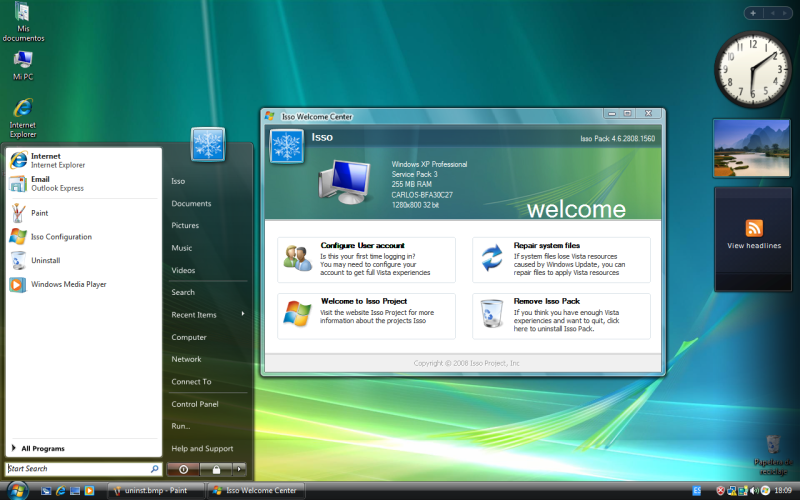
XP to Vista Transformation Pack

Posted by linksatoe | Wednesday, December 17, 2008 | | 0 comments »


If you're like me and use Windows XP but love the Vista Style then this is a must have for you. I have gone through so many visual themes and programs such as WindowsBlinds that not only slow down your computer but looks far from Vista. This is the best thing I've come across online that will transform your XP into Vista with all of its features and styles. The best thing about this pack is that it's only 28mb and doesn't slow down your computer.

Download
Say the Time 10.0.5.0

Posted by linksatoe | Wednesday, December 17, 2008 | , | 0 comments »

Get organized the fun and easy way! Say the Time will keep you on schedule by automatically announcing the date, time or both at specified intervals using a pleasant male or female voice. Keep track of important time commitments with fully-customizable appointment reminders. Manage ideas and information with colorful virtual sticky notes. Transform your boring taskbar time display into a colorful clock that can display both the date and the time. View the time in different parts of the world. And so much more!

Download

IconChanger v3.8

Posted by linksatoe | Saturday, November 15, 2008 | | 0 comments »

IconChanger - in Windows to each of of the known to the system types is file it is appropriated its ikonka, while IconChanger it makes possible for any file either folder to appoint individual ikonku - the very useful matter for the isolation, for example, most frequently utilized it is file in the large archives of music, graphs or documents. In the program there is the module of search and an option of the extraction of ikonok from the resources (exe, dll and the like). For convenience in the use the integration into the shell of operating system is possible - in this case the corresponding point appears in the menu of conductor opened on the right cry.

Download

Windows 7 - Log on Screen for XP Users

Posted by linksatoe | Tuesday, November 04, 2008 | | 0 comments »


Stardock WindowBlinds 6.3 Enhanced Final

Posted by linksatoe | Tuesday, October 21, 2008 | | 0 comments »

WindowBlinds is a one-of-a-kind utility that allows Windows users to completely change the look and feel of the Windows interface by applying a new skin. There are thousands of different skins to choose from that are freely downloadable from the WindowBlinds website. A WindowBlinds skin can change Windows to look like an alternative operating system, favorite sports car brands, favorite sports team, or virtually anything else. With modern video cards, WindowBlinds can do this without reducing performance.

Download

Fantastic Flame Screen Saver v7.00.800

Posted by linksatoe | Thursday, September 04, 2008 | | 0 comments »

There are some of Fantastic Flame run-time screenshots below. Currently Fantastic Flame comes with about 40 fire backgrounds and 70 fire styles (please take a look at the complete list at the fire styles page). That provides tons of amazing burning combinations! Please click on the fire thumbnails to enlarge the images. Unfortunatelly, a static image can't relay look and feel of living action. Please check these nice fire sounds that accompany the screensaver!
Download & Fix

Window Blinds 6.2 Enhanced

Posted by linksatoe | Monday, August 18, 2008 | | 0 comments »

Stardock WindowBlinds Enhanced v6.2
Windowblinds is a program which enables people to add new visual styles
Download

Desktop Butterflies 3D Screensaver 1.0

Posted by linksatoe | Thursday, August 14, 2008 | | 0 comments »


Desktop Butterflies 3D Screensaver 1.0

HyperDesk DarkMatter

Posted by linksatoe | Tuesday, August 12, 2008 | | 0 comments »

From the artists who created Alienware’s phenomenally popular desktop themes (Invader, ALXMorph, Darkstar, Superman, Star Wars & others) comes a fresh invasion of galactically cool desktops - introducing The DarkMatter Trilogy. Three unbelievably slick hypersuites that completely transform your desktop into a super-futuristic, hi-tech environment.
DarkMatter: Solar Flare contains 2 distinct hyperthemes in both dark and alloy styles, a WMP/iTunes remote Yahoo! widget featuring mind-blowing animations that have to be seen to be believed, a futuristic icon set that includes 6 different folder sets (vertical and horizontal layouts), a sleek Windows Media player skin that will play video (and audio) and an amazing otherworldly high-resolution wallpaper. Part of the DarkMatter Trilogy of hypersuites. Currently available for Windows XP only. You will need to download the free application, Yahoo! Widgets to use the hyper-animated audio remote.

Download

Set Wallpaper in you Folder

Posted by linksatoe | Wednesday, August 06, 2008 | | 0 comments »

Just put this file in ur folder and set wallpaper.....
Download

Dream Aquarium ScreenSaver Full

Posted by linksatoe | Monday, August 04, 2008 | | 0 comments »

Dream Aquarium is a next-generation aquarium screensaver that brings the beauty of a lush freshwater aquarium to your computer with unsurpassed realism.
* You can add and remove the fish you want
* change Tank look
* Feed your virtual fish
* Change Speed
* and heaps of other things.

Download

Top Most Downloaded Windows XP Themes

Posted by linksatoe | Tuesday, July 15, 2008 | | 0 comments »


Its is Very Easy to Apply these Themes using this UXPatcher,
1.Download and extract Ucpatcher
2.install uxpatcher.exe
3.Then find a file having this icon in your themes folder.
Image
4.Double click on that file,then you will find your theme has been changed

Download Uxpatcher

Desktop Icons Arranger v1.0

Posted by linksatoe | Wednesday, July 09, 2008 | | 0 comments »

Too many icons annoys your eyes?
Can't find easily your icons position after changing resolution?
Desktop Icons Arranger can cheer up your desktop making it pleasant and unique by arranging your icons in 56 different shapes and styles.
More, you can save and restore multiple desktop icons layout therfore you won't lose the old position of your desktop icons after changing resolution or after playing with this toy.

Download

PNG Glass Icons

Posted by linksatoe | Thursday, July 03, 2008 | | 0 comments »

ScreenSavers Vista For XP

Posted by linksatoe | Monday, June 30, 2008 | | 0 comments »


copy to c:/windowssystem32

Download

Lovely Folders 4

Posted by linksatoe | Monday, June 30, 2008 | | 0 comments »

Make your folders different. Make them lovely.
Lovely Folders is a powerful utility to customize your Windows folders. Using this handy program you can replace the standard folder icon for individual folders with any eye-catching icon you wish, chosen from hundreds of built-in colorful icons or generated automatically by internal IconConverter depending on the content of a folder (music, video, images, etc.). Moreover, Lovely Folders can change folder background! Your individual folders now may have a background image - just like your desktop. In addition, you can replace the system-defined standard folder icon, set an info tip for folders, rebuild the system icon cache, search for icons on your computer and much more.
Included 3 icon packs. New Vista-like interface

Download

Falco Icon Studio v2.7

Posted by linksatoe | Wednesday, June 25, 2008 | , | 0 comments »

Whether you design high-detail color icons we use the necessary tools. Falco software company presents a comfortable icon creation tool - Falco Icon Studio (Icon Maker, Icon Editor) allows creating, editing and managing icons and other small images.

It handles popular file formats used to store multiple icons of various sizes and all possible color system!

Falco Icon Studio(Icon Maker, Icon Editor) supports a comprehensive environment for professional designers and graphics producers to create unique icons for software products, application program, games and anything you want!

Key Features for Falco Icon Studio (Icon Maker, Icon Editor).

  1. Loading from DLL/EXE, BMP, GIF, PNG, JPG, ICO, CUR, ANI files.
  2. Saving in JPG, GIF, PNG, BMP, ICO, CUR, ANI formats.
  3. Unlimited UNDO/REDO.
  4. Copy/Paste in Multi - Windows.
  5. Paste from others Image Editors like MS Paint etc.
  6. Pencil, Line, Text, Rectangle, Ellipse, Filled Rectangle, Filled Ellipse, Fill Tool, Selection Tool, Color Selection Tool, Lasso Selection Tool, Hue Selection Tool, Blur, Eraser.
  7. Add/Remove Icons. The Adding presents in Custom Size with the different Color Depth (MonoChrome, 16 Colors, 256 Colors, True Color, 32 Bits).
  8. Effects: Rotates, Flips, Shifts, Contrast, Brightness, Invert Colors, Blur, GrayScale, HLS Adjustment, Sharpen, Emboss, Contour, Contrast Filter, High Contrast Filter, Prewitt, Sobel, Laplas.
  9. Any Size up to 2048 x 2048.
  10. BMP & PNG 32 bits supporting with trasparancy.
  11. Vista Supporting.
  12. Multi-file opening.
  13. WEB-Camera and Scanner Supporting.
Download

Vista Sounds Pack for Windows XP

Posted by linksatoe | Saturday, June 07, 2008 | | 0 comments »

Vista Sounds Pack for Windows XP
Size: 7 MB

Make your XP sound like Windows Vista! Just run and enjoy...
Silent installer overwrites your existing sound files.

IMPORTANT:
- This pack will OVERWRITES your current sound files. So back them up before
running this file!
- You can find your current sound files in "C:>WINDOWS>Media" so just make
a copy of that folder before you run this file. Then if you ever want to restore your
XP original files, just copy the contents of your backed-up Media folder back into "C:>WINDOWS>Media".
And yeah, You realy can notice the difference...

Download
Password : mainp